
RS232 Cables: wiring & pin connections
Wiring and constructional details for RS232 serial data cables: pin connections DB9 (9 way) & DB25 (25 way).
RS232 Includes:
RS232 basics
RS232 standard
Software handshaking
Signals & voltage levels
Pinouts & connectors
Loopback connections
RS232 cables
Serial Data standards:
Serial data standards
RS422
RS449
RS485
20 mA current loop
Whenever RS232 is used, RS232 cables will be needed to provide the required electrical connection.
These cable can take a variety of forms in terms of the physical methods used for construction as well as the number of connections that are incorporated within the overall RS232 cable.
When constructing a cable, it should be remembered that not all the signals provided within RS232 need to be implemented in a practical RS232 data cable. As a result, designs for a variety of serial data cables may be seen on the Internet and elsewhere.
In addition to this, further confusion is caused by the fact that RS232 was designed to connect modems and terminal devices or teleprinters so that telephone lines could be used to transit data over the telephone system, and serial data cables were required to connect the equipment at the remote end. This intended application for RS232 gives rise to the terminology associated with these serial data connections, i.e. DCE (Data Communications Equipment or Modem) and the DTE (Data Terminal Equipment or teleprinter).
Although many manufacturers agree on the general application of the types of RS232 serial data cables, there is still confusion in many quarters over what may be required. As a result it is always best to be aware of the complications that exist. As a result it may often be necessary to experiment a little.
Serial data cable basics
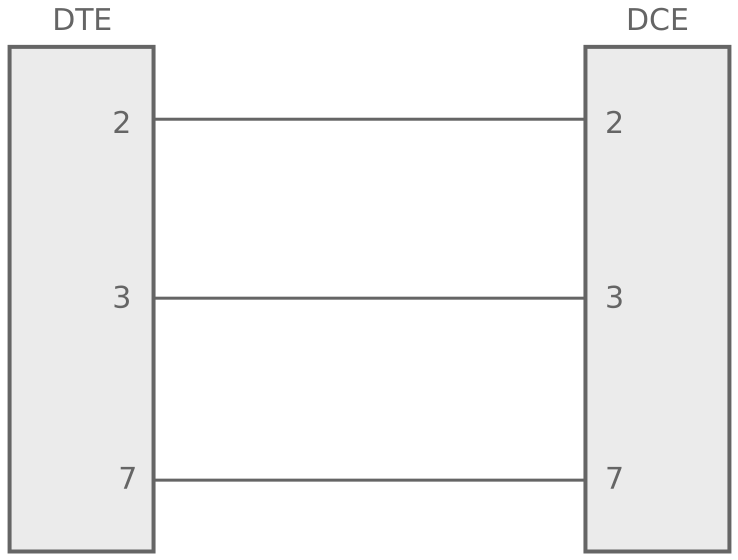
Pins are assigned within the DTE and DCE such that a "1:1" cable should be used, i.e. on where pin number X at one end is connected to pin number X at the other end and there are no crossovers.
Thus a DTE transmits data on pin 2 and the DCE receivers data on pin 2. Similarly The DTE receives data on pin 3, whereas the DCE transmits on pin 2.
Adopting this approach makes the construction of RS232 serial data cables much easier. It also saves considerable complications by not having to work out which wires to cross over in the serial data cable.
Complications do arise when cables are required to connect two items both configured as the same form of equipment, i.e. both a DTE or both a DCE.
Serial data cable diagrams and pin connections
Different data systems utilise different levels of handshaking when using RS232. Some of the simpler systems just send the data without any hard wired handshaking and as a result the serial data cables required for this are very simple. These systems may utilise the use of software codes such as X-ON / X-OFF, ACK, NAK, etc to provide the handshaking that is required. These systems require serial data cables that incorporate the transmit and receive data lines as well as an earth line. A suitable cable is shown below.
More comprehensive systems may utilise the additional lines provided by RS232. According serial data cables for these systems require the additional lines to be incorporated into the serial data cables for them to operate correctly. A suitable cable is shown below.
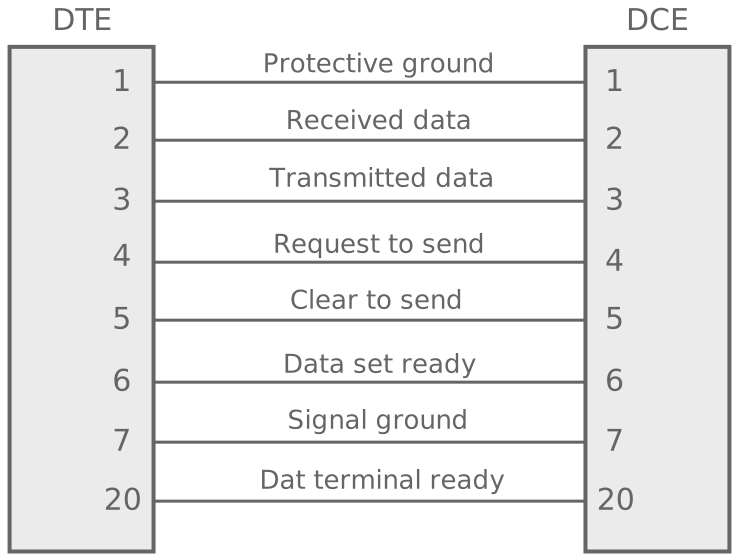
The RS232 cable shown above gives the more likely connections seen in an RS232 cable. Some cables could have more connections for additional functionality, but these are rarely used.
Constructing RS232 cables
There are several methods that can be used to construct RS232 cables and the method chosen should be selected according to the requirements, cost timescales, level of reliability, etc.
The most straightforward is to have two solder type connectors and to wire between them, one to one. This can be time consuming, but often provides a good cable provided a few precautions are adopted.
A second approach is to use an insulation displacement style cable. And connectors. This is exceedingly easy to implement, but may not be as robust or provide the screening needed to protect the integrity of the transmitted data over any distance.
To ensure the cable operates satisfactorily there are a few precautions that can be adopted.
- Use strain relief on connectors: As the RS232 cables could undergo flexing, it is necessary to ensure that good strain relief is provided. Most connectors have options for adding strain relief and this should be adopted.
- Ensure no solder shorts on solder type connectors: When soldering the connectors for the cables it is easy to develop a short as a result of excess solder. Thoroughly inspect and electrically check the cable before use.
- Have a protective sleeve over wiring: With the possibility of many wires being connected, these should be kept under control in a sleeve. There are many types of sleeve that can be sued and these will give protection as well as keeping he wires together.
- Provide screening if cable in high noise environment: Some environments that have high levels of electrical noise may require a screen to be placed over the cable. This can be incorporated as part of the ground system.
While it is possible to buy RS232 serial data cables, it is also easy to manufacture them if the relevant connectors are available. If there are no complications, i.e. they are wires as for a DTE to DCE connection, a serial data cable will simply require one to one connections of the required pins.
Wireless & Wired Connectivity Topics:
Mobile Communications basics
2G GSM
3G UMTS
4G LTE
5G
Wi-Fi
Bluetooth
IEEE 802.15.4
DECT cordless phones
Networking fundamentals
What is the Cloud
Ethernet
Serial data
USB
LoRa
VoIP
SDN
NFV
SD-WAN
Return to Wireless & Wired Connectivity