Power over Ethernet: IEEE 802.3af, 802.3at, 802.3bt
Power over Ethernet, PoE, IEEE 802.3af & 802.3at and also called Power over LAN, PoL, is a useful way of powering equipment that uses Ethernet connectivity
Ethernet IEEE 802.3 Includes:
Ethernet introduction
Standards
Ethernet data frame structure
100Mbps Fast Ethernet
Gigabit Ethernet, 1GE
10 Gigabit Ethernet, 10GE
Single Pair Ethernet, SPE
Ethernet cables
How to buy Ethernet cables
How long can an Ethernet cable be
Routers, hubs, switches - the differences
Ethernet switch
How to buy best Ethernet switch
Ethernet industrial switch
Power over Ethernet, PoE
Ethernet splitter
Carrier Ethernet
Ethernet Products Shopping Page
Power over Ethernet, PoE, sometimes also called Power over LAN, PoL is a technique that allows power to be supplied to end devices over the Ethernet cables connecting the data.
This approach of providing power over the Ethernet cable can significantly simplify installations for small devices that would require the use of an additional power supply. Particularly when they may in less accessible positions where power may not be easily accessible, or in areas where further wiring can be an inconvenience, power over Ethernet is an ideal option.
Originally the concept was defined under IEEE 802.3af, but after its initial introduction the standard was refined and released with many enhancements as IEEE 802.3at. By having the standard defined by the IEEE, the organisation that controls the other Ethernet standards, it means that products from different suppliers will all work together.
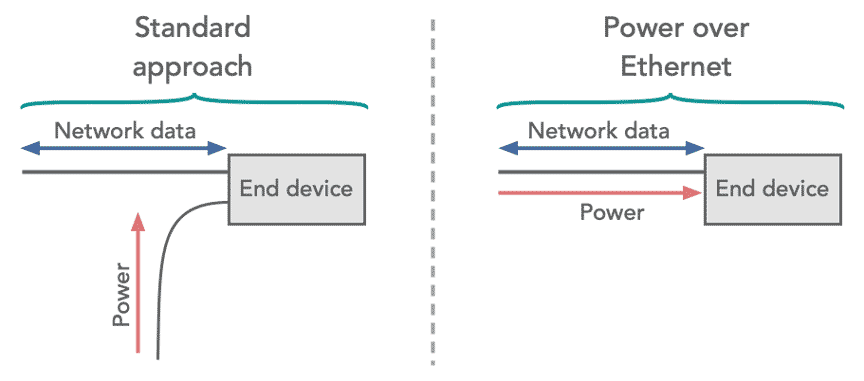
Reasons for using Power over Ethernet
The use of Power over Ethernet, PoE gives a number of advantages for both installation and use:
- Time & cost savings: The use of power over Ethernet can give some significant cost savings in terms of installation and maintenance. If a separate power supply is used,, wiring for this will need to be run to the remote device. This will mean that there is additional time required, and the cost of the additional supply. Although Ethernet switches and routers with PoE cost a little more, this will be much less than the cost of installing two separate lines and the use of an additional supply.
- Flexibility & ease of installation: The use of Power over Ethernet provides a significant increase in flexibility as it is not necessary to consider how to run power to the device - it is simply a matter of connecting the PoE system together using the data cables.
- Safety: Power delivery using PoE is intelligent as it is protected from overload, short circuits, etc. Installation is foolproof as only the data cables need to be connected.
- Reliability: As there are no small power supplies required for the devices and the power is supplied centrally, reliability is significantly improved.
- Scalability: Using power that is delivered from a central point means that the system can be scaled up very easily.
Devices that use Power over Ethernet
There are many different devices that use Power over Ethernet as it provides a cost effective and easy solution to powering small remote devices.
Typical examples of devices that use power over Ethernet include:
- VoIP phones: The use of VoIP phones is growing, especially for offices. When separate phones are used (unlike the phone capability incorporated into computers, power is needed for the phones. It is far easier to provide power for these phones using a central supply in an Ethernet switch, than have a host of small power supplies around the office that are easily broken.
- IP Cameras: With cameras being increasing used for security and other applications, and many of these cameras using Ethernet to send back the video signals, using Power over Ethernet significantly simplifies the installation as it is only necessary to route one cable to the device.
- Wireless access points: In some applications, wireless access points will be mounted, possibly in large offices or even cafes, shopping malls, etc and these will be connected by Ethernet to the main router. Power is conveniently supplied using PoE.
- RFID readers: Many RFID readers use an Ethernet connection to link them to a central database or computer system. Again using Power over Ethernet with power supplied by the Ethernet switch means that installation is considerably simplified.
- Other devices: There are many other devices that use PoE including wall clocks (that us network time protocol), IPTV decoders, access control systems, and even some microwave point to point radio systems, although these often use proprietary PoE schemes.
These are but a few examples of the devices that can use power over Ethernet. In reality there are very many more items that can use power over Ethernet to simplify installation and overall provide a better level of reliability and reduce the cost of installation and maintenance.
What devices provide power for PoE
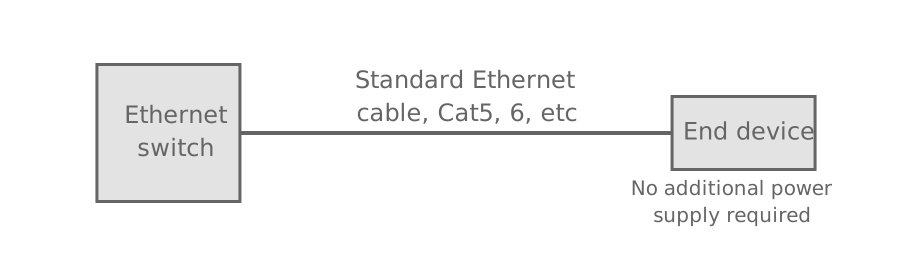
The main devices that are used to provide power in a PoE system are Ethernet switches. For example VoIP phones in an office environment will each be connected to an Ethernet switch, so it is these devices that normally provide the power.
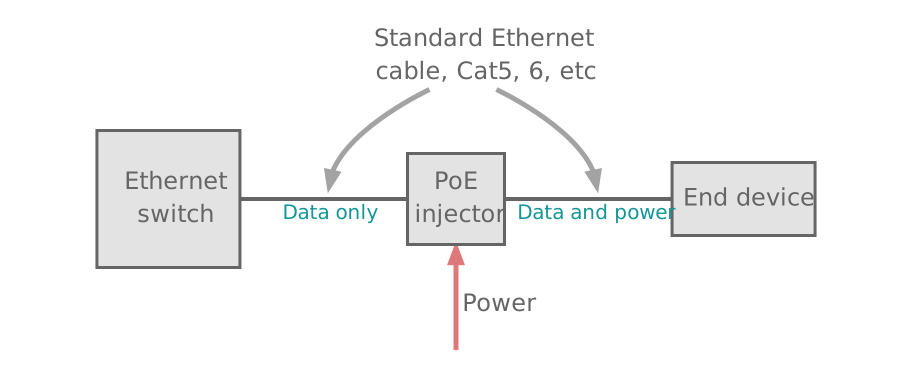
Another approach is to use what is termed a Power over Ethernet injector. Although Ethernet switches are available with PoE capability, millions of regular "non-PoE" switches are already installed. The PoE injector fits neatly into the line between the Ethernet switch and the device to be powered and it provides the power that can be passed long the cable.
There are various standards for PoE:
- IEEE 802.3af: The 802.3af standard was the first to be released and this provided for power levels of up to around 15 watts to be accommodated. Most devices use up to this amount. More exactly PoE devices can supply a maximum of 15.4 watts, but over a length of cable this will reduce and the minimum guaranteed power per port is 12.95 watts. Devices that conform to 802.3af are also known as Type 1 devices.
- IEEE 802.3at PoE+: IEEE 802.3at was an update to the original specification and is sometimes referred to as PoE plus or PoE+. It can supply up to a maximum of 30 watts per port, although over the cable length this can be reduced to a minimum guaranteed power level of 25.4 watts. Devices conforming to this standard are sometimes referred to as Type 2 devices.
- IEEE 802.3bt: IEEE 802.3bt 4PPoE was released in September 2018 and provides increased power capability. The standard introduces two additional power types:
- Type 3: These devices are up to 55 watts.
- Type 4: These devices are up to 90 - 100 watts.
In addition to the higher current capabilities, support is added for power over Ethernet within 2.5Gb, 5Gb and 10Gb Ethernet copper based systems.
There have been some misconceptions about the ratings in some quarters, that the 13 or 25.5 watts must be consumed by the device being used, and using an PoE Ethernet switch or other device that can supply more power than is needed will result int he device being overloaded and destroyed. Simply the device will draw as much current as it needs, and no more. Having a PoE supply that can supply more than is needed will not result in any overloads.
What Ethernet cable to use for PoE
One of the real advantages of using Power over Ethernet is that the standard Cat 5, Cat 6 or even Cat 7 cables can be used. The very old Cat 3 cables can even be used if low power is all that is needed, but Cat 5 and above are much easier to obtain these days and perform better for Power over Ethernet. These cables all use the normal RJ45 connectors used on these Ethernet cables
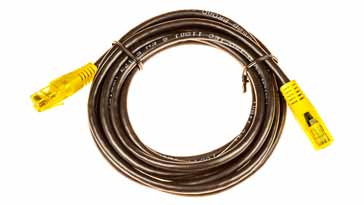
This means that if there is a change from using a system without PoE to one that uses it, the cabling does not need to be replaced, provided that is uses the standard cable types.
By adopting the use of standard cables, this means that PoE can be installed very easily and with the minimum of additional cost.
PoE Development
With Ethernet now an established standard, one of the limitations of Ethernet related equipment was that it required power and this was not always easily available. As a result some manufacturers started to offer solutions whereby power could be supplied over the Ethernet cables themselves. To prevent a variety of incompatible Power over Ethernet, PoE, solutions appearing on the market, and the resulting confusion, the IEEE began their standardisation process in 1999.
A variety of companies were involved in the development of the IEEE standard. The result was the IEEE802.3af standard that was approved for release on 12 June 2003. Although some products were released before this date and may not fully conform to the standard, most products available today will conform to it, especially if they quote compliance with 802.3af.
A further standard, designated IEEE 802.3at was released in 2009 and this provided for several enhancements to the original IEEE 802.3af specification.
PoE technology
The standard allows for a supply of 48 volts with a maximum current of 400 milliamps to be provided over two of the available four pairs used on Cat 3 or Cat 5 cable. While this sounds very useful with a maximum available power of 19.2 watts, the losses in the system normally reduce this to just under 13 watts.
The standard Cat 5 cable has sets of twisted pair cable, and the IEEE standard allows for either to be used for 10Base-T and 100Base-T systems. The standard allows for two options for Power over Ethernet: one uses the spare twisted pairs, while the second option uses the wires carrying the data. Only one option may be used and not both.
When using the spare twisted pairs for the supply, the pair on pins 4 and 5 connected together and normally used for the positive supply. The pair connected to pins 7 and 8 of the connector are connected for the negative supply. While this is the standard polarity, the specification actually allows for either polarity to be used.
When the pairs used for carrying the data are employed it is it is possible to apply DC power to the centre tap of the isolation transformer that are used to terminate the data wires without disrupting the data transfer. In this mode of operation the pair on pins 3 and 6 and the pair on pins 1 and 2 can be of either polarity.
As the supply reaching the powered device can be of either polarity a full wave rectifier (bridge rectifier) is used to ensure that the device consuming the power receives the correct polarity power.
Within the 802.3af standard two types of device are described:
- Power Sourcing Equipment, PSE This is the equipment that supplies power to the Ethernet cable. A variety of devices can act as a PSE: Ethernet switches are very common forms of PSE. It is also possible to use a power injector in a line where there is no other PSE.
- Powered Devices, PD This is equipment that interfaces to the Ethernet cable and is powered by supply on the cable. These equipments may range from VoIP phones to remote cameras for security to other small devices like RFID readers, etc..
Power over Ethernet connections
It is useful to have the connections for the power on an Ethernet cable or connector for using PoE.
| Ethernet Cable Pinout & Details |
|||||||
|---|---|---|---|---|---|---|---|
| Pin No |
Colour | 10 / 100Base-T | 1000Base-T | PoE Mode A |
PoE Mode B |
||
| 1 | White / green | +TX | +BI_DA | 48 V out | |||
| 2 | Green | -TX | -BI_DA | 48 V out | |||
| 3 | White / orange | +RX | +BI_DB | 48 V return | |||
| 4 | Blue | +BI_DC | 48 V out | ||||
| 5 | Blue / white | -BI_DC | 48 V out | ||||
| 6 | Orange | -RX | -BI_DB | 48 V return | |||
| 7 | White / brown | +BI_DD | 48 V return | ||||
| 8 | Brown | -BI_DD | 48 V return | ||||
Power Sourcing Equipment, PSE
This needs to provide a number of functions apart from simply supplying the power over the Ethernet system.
When looking at the power budget for the system, although the maximum per port may be 15 watts for a PoE device and 30 watts for a PoE+ device, check the overall power budget as the Ethernet switch or other device supplying the power may not be capable of providing the maximum power to all of its ports at the same time. For example an Ethernet switch may have 8 ports, and each be capable of providing a maximum of 15 watts, but the total power for the Ethernet switch may only be 100 watts, 20 watts short of the power required to supply each one with the maximum. This is perfectly legitimate because it is unlikely that each port will be required to provide the full power for each port.
One requirement for PoE PSEs is to check that no damage is possible to any equipment that may be present on the Ethernet system. The nominal 48 volts provided is fine for PoE devices and PoE compatible devices, but for some, this level of voltage could damage the circuitry.
To overcome this issue, the PSE first looks for devices that comply with the IEEE 802.3af specification. This is achieved by applying a small current-limited voltage to the cable.
The PSE then checks for the presence of a 25k ohm resistor in the remote device. If this load or resistor is detected, then the 48V is applied to the cable, but it is still current-limited to prevent damage to cables and equipment under fault conditions.
The PSE will continue to supply power until the Powered Device, PD is removed, or the it stops drawing its minimum current.
Powered Device, PD
The powered device must be able to operate within the confines of the Power over Ethernet specification. It receives a nominal 48 volts from the cable, and must be able to accept power from either option, i.e. either over the spare or data cables.
Additionally the 48 volts supplied is too high for operating the electronics to be powered, and accordingly an isolated DC-DC converter is used to transform the 48V to a lower voltage. This also enables 1500V isolation to be provided for safety reasons.
Power over Ethernet, PoE classes
Power over Ethernet enabled devices are assigned classes according to their power. The four classes are broadly, very low power, low power, and medium power. The high power class is reserved for use in association only with PoE+ PSEs.
| Power Over Ethernet PoE Classes |
||
|---|---|---|
| PoE Power class | PSE Power Available | Max PD Power |
| 1 | 4.0 | 3.84 |
| 2 | 7.0 | 6.49 |
| 3 | 15.4 | 12.95 |
| 4 | 30 | 25.5 |
Power over Ethernet, PoE, defined as IEEE 802.3af or the enhancements under IEEE 802.3at provide a particularly valuable means of remotely supplying and controlling equipment that may be connected to an Ethernet network or system. PoE enables units to be powered in situations where it may not be convenient to run in a new power supply for the unit. While there are limitations to the power that can be supplied, the intention is that only small units are likely to need powering in this way. Larger units can be powered using more conventional means.
Wireless & Wired Connectivity Topics:
Mobile Communications basics
2G GSM
3G UMTS
4G LTE
5G
Wi-Fi
Bluetooth
IEEE 802.15.4
DECT cordless phones
Networking fundamentals
What is the Cloud
Ethernet
Serial data
USB
LoRa
VoIP
SDN
NFV
SD-WAN
Return to Wireless & Wired Connectivity